> For the complete documentation index, see [llms.txt](https://docs.mindee.com/llms.txt). Markdown versions of documentation pages are available by appending `.md` to page URLs; this page is available as [Markdown](https://docs.mindee.com/v1/utilities/automatically-extracting-receipts-using-the-mindee-client-libraries.md).
# Automatically Extracting Receipts Using the Mindee Client Libraries
{% hint style="info" %}
The Node.js library implementation differs from our other supported languages, see [the Node.js dedicated tutorial](/v1/utilities/extracting-and-parsing-multi-receipts-tutorial-nodejs.md) instead.
{% endhint %}
## Overview
{% hint style="success" %}
Just want to get to the full script? Jump to the [relevant section](#full-script).
{% endhint %}
### When to Use This Feature
Use the Multi-Receipts Detector API when you have:
* A single image containing multiple receipts
* The need to process each receipt individually without manual separation
* A desire to streamline receipt processing workflows
The Multi-Receipts Detector API scans the contents of a file, identifies the coordinates of individual receipts, and allows for their extraction and separate processing.
{% hint style="info" %}
**Note:** For PDFs, the API applies this principle at a page level, treating each page as a separate image.
{% endhint %}
## Prerequisites
Before you begin, ensure you have:
* A valid and up-to-date [Mindee API key](/v1/get-started/create-api-key.md)
* An active subscription to the [Multi-Receipts Detector API](https://platform.mindee.com/mindee/multi_receipts_detector)
* An active subscription to the [Receipt OCR API](https://platform.mindee.com/mindee/expense_receipts) (Also works with the [Financial Document OCR API](https://platform.mindee.com/mindee/financial_document))
* The Mindee client library installed for your programming language
## Sample File
For this tutorial, we'll use the following sample multi-receipt image:
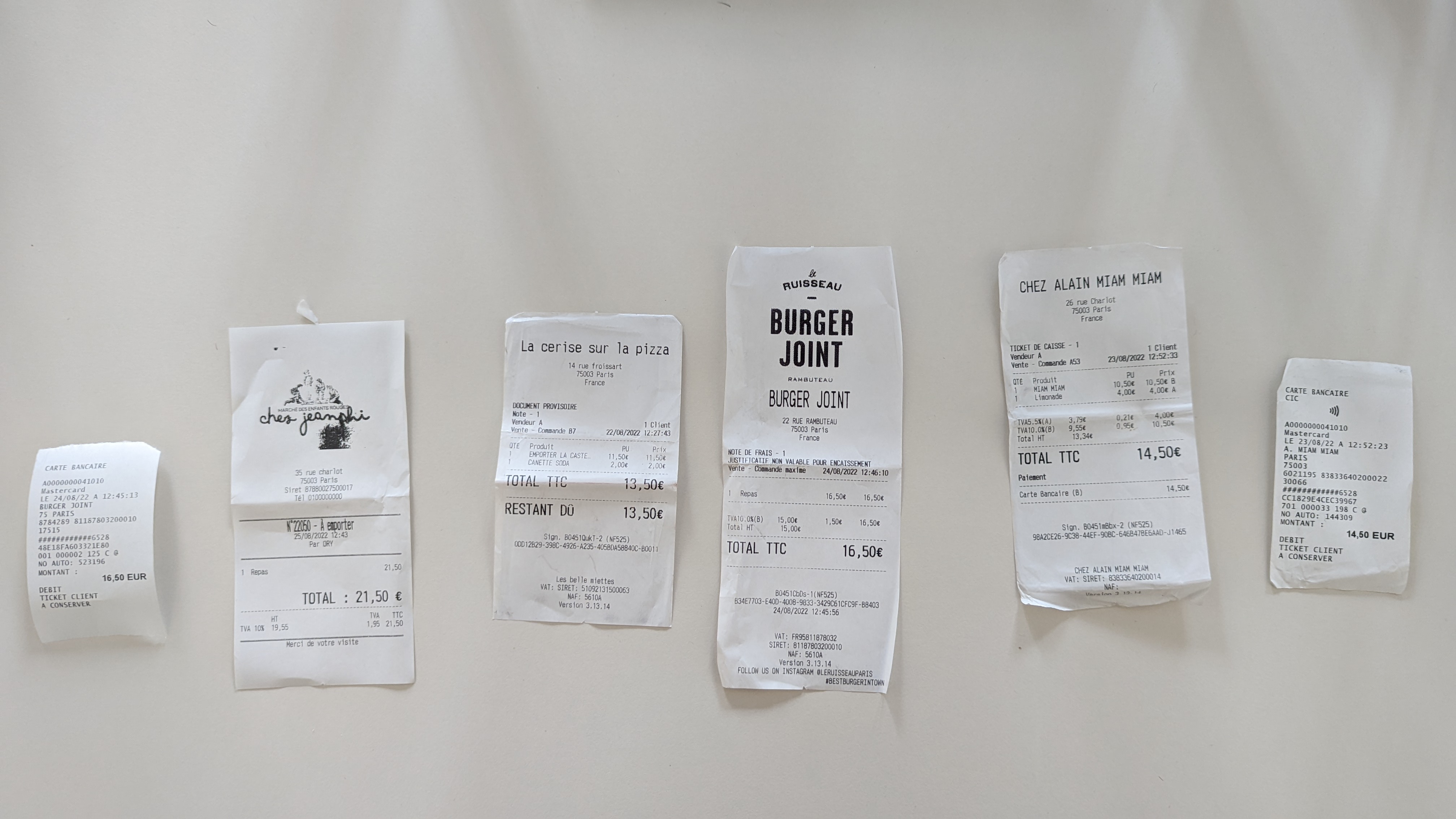 When preparing your own files, ensure that:
* Receipts are clear, unstained, and properly unfolded
* Receipts don't overlap and are fully within the image
* Receipts are aligned in roughly the same direction
* No other types of documents are mixed in with the receipts
## Basic Setup
1. Import the necessary classes from the Mindee library.
2. Initialize the Mindee client with your API key.
3. Load the input file.
{% tabs %}
{% tab title="Python" %}
```python
from mindee import Client, product
from mindee.extraction.multi_receipts_extractor.multi_receipts_extractor import (
extract_receipts,
)
mindee_client = Client(api_key="my-api-key-here")
# mindee_client = Client() # Optionally, set from env.
```
{% endtab %}
{% tab title="PHP" %}
```php
parse(MultiReceiptsDetectorV1::class, $inputSource);
```
{% endtab %}
{% tab title="Ruby" %}
```ruby
input_source = mindee_client.source_from_path(file_path)
result_split = mindee_client.parse(
input_source,
Mindee::Product::MultiReceiptsDetector::MultiReceiptsDetectorV1,
close_file: false
)
```
{% endtab %}
{% tab title="Java" %}
```java
LocalInputSource inputSource = new LocalInputSource(new File(filePath));
PredictResponse resultSplit =
mindeeClient.parse(MultiReceiptsDetectorV1.class, inputSource);
```
{% endtab %}
{% tab title=".NET" %}
```csharp
var inputSource = new LocalInputSource(filePath);
var resutlSplit = await mindeeClient.ParseAsync(inputSource).ConfigureAwait(false);
```
{% endtab %}
{% endtabs %}
### Extract Individual Receipts
Extract the detected receipts from the original image:
{% tabs %}
{% tab title="Python" %}
```py
extracted_receipts = extract_receipts(input_doc, result_split.document.inference)
```
{% endtab %}
{% tab title="PHP" %}
```php
countDocPages();
$totalExtractedReceipts = [];
$pages = $multiReceiptsResult->document->inference->pages;
for ($i = 0; $i < $pageCount; $i++) {
$receiptsPositions = $pages[$i]->prediction->receipts;
$extractedReceipts = $imageExtractor->extractImagesFromPage($receiptsPositions, $i);
$totalExtractedReceipts = array_merge($totalExtractedReceipts, $extractedReceipts);
}
```
{% endtab %}
{% tab title="Ruby" %}
```ruby
images = Mindee::Extraction::MultiReceiptsExtractor.extract_receipts(
input_source, result_split.document.inference
)
```
{% endtab %}
{% tab title="Java" %}
```java
for (Page page : resultSplit.getDocument().getInference().getPages()) {
List subImages = imageExtractor.extractImagesFromPage(
page.getPrediction().getReceipts(),
page.getPageId()
);
```
{% endtab %}
{% tab title=".NET" %}
```csharp
var imageExtractor = new ImageExtractor(inputSource);
foreach (var page in resutlSplit.Document.Inference.Pages)
{
var subImages = imageExtractor.ExtractImagesFromPage(
page.Prediction.Receipts, page.Id);
//...
}
```
{% endtab %}
{% endtabs %}
### Process Each Receipt
Loop through the extracted receipts and process each one with the Receipt OCR API:
```py
for idx, receipt in enumerate(extracted_receipts, 1):
result_receipt = mindee_client.parse(product.ReceiptV5, receipt.as_source())
print(f"Receipt {idx}:")
print(result_receipt.document)
print("-" * 40)
# Uncomment to save each extracted receipt
# save_path = f"./receipt_{idx}.pdf"
# receipt.save_to_file(save_path)
```
```php
writeToFile("output/path");
$result = $client->parse(ReceiptV5::class, $receipt->asInputSource());
echo $result->document . "\n";
}
```
```ruby
images.each do |sub_image|
# Optional: Save the files locally
# sub_image.write_to_file("/path/to/my/extracted/file/folder")
result_receipt = mindee_client.parse(
sub_image.as_source,
Mindee::Product::Receipt::ReceiptV5,
close_file: false
)
puts result_receipt.document
end
```
```java
for (ExtractedImage subImage : subImages) {
// Optionally: write to a file
// subImage.writeToFile("/path/to/my/extracted/file/folder");
PredictResponse resultReceipt =
mindeeClient.parse(ReceiptV5.class, subImage.asInputSource());
System.out.println(resultReceipt.getDocument().toString());
}
```
```csharp
foreach (var subImage in subImages)
{
// subImage.WriteToFile($"/path/to/my/extracted/file/folder"); // Optionally: write to a file
var resultReceipt = await mindeeClient.ParseAsync(subImage.AsInputSource()).ConfigureAwait(false);
Console.WriteLine(resultReceipt.Document);
}
```
## Example Output
After processing, you'll receive detailed information about each receipt. Here's a sample output:
```rst
########
Document
########
:Mindee ID: 8506a82c-bc1f-4d5b-abd1-174f60459091
:Filename: receipt_p0_0.pdf
Inference
#########
:Product: mindee/expense_receipts v5.1
:Rotation applied: Yes
Prediction
==========
:Expense Locale: fr-FR; fr; FR; EUR;
:Purchase Category: miscellaneous
:Purchase Subcategory:
:Document Type: CREDIT CARD RECEIPT
:Purchase Date: 2022-08-24
:Purchase Time: 12:45
:Total Amount: 16.50
:Total Net:
:Total Tax:
:Tip and Gratuity:
:Taxes:
+---------------+--------+----------+---------------+
| Base | Code | Rate (%) | Amount |
+===============+========+==========+===============+
:Supplier Name:
:Supplier Company Registrations: 81187803200010
:Supplier Address:
:Supplier Phone Number:
:Line Items:
Page Predictions
================
Page 0
------
:Expense Locale: fr-FR; fr; FR; EUR;
:Purchase Category: miscellaneous
:Purchase Subcategory:
:Document Type: CREDIT CARD RECEIPT
:Purchase Date: 2022-08-24
:Purchase Time: 12:45
:Total Amount: 16.50
:Total Net:
:Total Tax:
:Tip and Gratuity:
:Taxes:
+---------------+--------+----------+---------------+
| Base | Code | Rate (%) | Amount |
+===============+========+==========+===============+
:Supplier Name:
:Supplier Company Registrations: 81187803200010
:Supplier Address:
:Supplier Phone Number:
:Line Items:
########
Document
########
:Mindee ID: f8e5b080-533e-43b6-b4bb-ef77208a74a3
:Filename: receipt_p0_1.pdf
Inference
#########
:Product: mindee/expense_receipts v5.1
:Rotation applied: Yes
Prediction
==========
:Expense Locale: fr-FR; fr; FR; EUR;
:Purchase Category: food
:Purchase Subcategory: restaurant
:Document Type: EXPENSE RECEIPT
:Purchase Date: 2022-08-25
:Purchase Time: 12:43
:Total Amount: 21.50
:Total Net: 19.55
:Total Tax: 1.95
:Tip and Gratuity:
:Taxes:
+---------------+--------+----------+---------------+
| Base | Code | Rate (%) | Amount |
+===============+========+==========+===============+
| 19.55 | TVA | 10.00 | 1.95 |
+---------------+--------+----------+---------------+
:Supplier Name: CHES
:Supplier Company Registrations: 87880027500017
:Supplier Address: 35 rue charlot 75003 paris
:Supplier Phone Number: 0100000000
:Line Items:
+--------------------------------------+----------+--------------+------------+
| Description | Quantity | Total Amount | Unit Price |
+======================================+==========+==============+============+
| Repas | 1.00 | 21.50 | |
+--------------------------------------+----------+--------------+------------+
Page Predictions
================
Page 0
------
:Expense Locale: fr-FR; fr; FR; EUR;
:Purchase Category: food
:Purchase Subcategory: restaurant
:Document Type: EXPENSE RECEIPT
:Purchase Date: 2022-08-25
:Purchase Time: 12:43
:Total Amount: 21.50
:Total Net: 19.55
:Total Tax: 1.95
:Tip and Gratuity:
:Taxes:
+---------------+--------+----------+---------------+
| Base | Code | Rate (%) | Amount |
+===============+========+==========+===============+
| 19.55 | TVA | 10.00 | 1.95 |
+---------------+--------+----------+---------------+
:Supplier Name: CHES
:Supplier Company Registrations: 87880027500017
:Supplier Address: 35 rue charlot 75003 paris
:Supplier Phone Number: 0100000000
:Line Items:
+--------------------------------------+----------+--------------+------------+
| Description | Quantity | Total Amount | Unit Price |
+======================================+==========+==============+============+
| Repas | 1.00 | 21.50 | |
+--------------------------------------+----------+--------------+------------+
########
Document
########
:Mindee ID: 6812060a-b9e4-4e45-8492-00aef14de36d
:Filename: receipt_p0_2.pdf
Inference
#########
:Product: mindee/expense_receipts v5.1
:Rotation applied: Yes
Prediction
==========
:Expense Locale: fr-FR; fr; FR; EUR;
:Purchase Category: food
:Purchase Subcategory: restaurant
:Document Type: EXPENSE RECEIPT
:Purchase Date: 2022-08-22
:Purchase Time: 12:27
:Total Amount: 13.50
:Total Net:
:Total Tax:
:Tip and Gratuity:
:Taxes:
+---------------+--------+----------+---------------+
| Base | Code | Rate (%) | Amount |
+===============+========+==========+===============+
:Supplier Name: LA CERISE SUR LA PIZZA
:Supplier Company Registrations: 51092131500063
:Supplier Address: 14 rue froissart 75003 paris france
:Supplier Phone Number:
:Line Items:
+--------------------------------------+----------+--------------+------------+
| Description | Quantity | Total Amount | Unit Price |
+======================================+==========+==============+============+
| EMPORTER LA CASTE | 1.00 | 11.50 | 11.50 |
+--------------------------------------+----------+--------------+------------+
| CANETTE SODA | 1.00 | 2.00 | 2.00 |
+--------------------------------------+----------+--------------+------------+
Page Predictions
================
Page 0
------
:Expense Locale: fr-FR; fr; FR; EUR;
:Purchase Category: food
:Purchase Subcategory: restaurant
:Document Type: EXPENSE RECEIPT
:Purchase Date: 2022-08-22
:Purchase Time: 12:27
:Total Amount: 13.50
:Total Net:
:Total Tax:
:Tip and Gratuity:
:Taxes:
+---------------+--------+----------+---------------+
| Base | Code | Rate (%) | Amount |
+===============+========+==========+===============+
:Supplier Name: LA CERISE SUR LA PIZZA
:Supplier Company Registrations: 51092131500063
:Supplier Address: 14 rue froissart 75003 paris france
:Supplier Phone Number:
:Line Items:
+--------------------------------------+----------+--------------+------------+
| Description | Quantity | Total Amount | Unit Price |
+======================================+==========+==============+============+
| EMPORTER LA CASTE | 1.00 | 11.50 | 11.50 |
+--------------------------------------+----------+--------------+------------+
| CANETTE SODA | 1.00 | 2.00 | 2.00 |
+--------------------------------------+----------+--------------+------------+
########
Document
########
:Mindee ID: ac5a337b-7ca2-4acd-8a3f-a2cf54697ede
:Filename: receipt_p0_3.pdf
Inference
#########
:Product: mindee/expense_receipts v5.1
:Rotation applied: Yes
Prediction
==========
:Expense Locale: fr-FR; fr; FR; EUR;
:Purchase Category: food
:Purchase Subcategory: restaurant
:Document Type: EXPENSE RECEIPT
:Purchase Date: 2022-08-24
:Purchase Time: 12:45
:Total Amount: 16.50
:Total Net: 15.00
:Total Tax: 1.50
:Tip and Gratuity:
:Taxes:
+---------------+--------+----------+---------------+
| Base | Code | Rate (%) | Amount |
+===============+========+==========+===============+
| 15.00 | TVA | 10.00 | 1.50 |
+---------------+--------+----------+---------------+
:Supplier Name: BUR
:Supplier Company Registrations: FR95811878032
81187803200010
:Supplier Address: 22 rue rambuteau 75003 paris france
:Supplier Phone Number:
:Line Items:
+--------------------------------------+----------+--------------+------------+
| Description | Quantity | Total Amount | Unit Price |
+======================================+==========+==============+============+
| Repas | 1.00 | 16.50 | 16.50 |
+--------------------------------------+----------+--------------+------------+
Page Predictions
================
Page 0
------
:Expense Locale: fr-FR; fr; FR; EUR;
:Purchase Category: food
:Purchase Subcategory: restaurant
:Document Type: EXPENSE RECEIPT
:Purchase Date: 2022-08-24
:Purchase Time: 12:45
:Total Amount: 16.50
:Total Net: 15.00
:Total Tax: 1.50
:Tip and Gratuity:
:Taxes:
+---------------+--------+----------+---------------+
| Base | Code | Rate (%) | Amount |
+===============+========+==========+===============+
| 15.00 | TVA | 10.00 | 1.50 |
+---------------+--------+----------+---------------+
:Supplier Name: BUR
:Supplier Company Registrations: FR95811878032
81187803200010
:Supplier Address: 22 rue rambuteau 75003 paris france
:Supplier Phone Number:
:Line Items:
+--------------------------------------+----------+--------------+------------+
| Description | Quantity | Total Amount | Unit Price |
+======================================+==========+==============+============+
| Repas | 1.00 | 16.50 | 16.50 |
+--------------------------------------+----------+--------------+------------+
########
Document
########
:Mindee ID: 2fc54836-61eb-4c0f-b3f3-35717505f7aa
:Filename: receipt_p0_4.pdf
Inference
#########
:Product: mindee/expense_receipts v5.1
:Rotation applied: Yes
Prediction
==========
:Expense Locale: fr-FR; fr; FR; EUR;
:Purchase Category: food
:Purchase Subcategory: restaurant
:Document Type: EXPENSE RECEIPT
:Purchase Date: 2022-08-23
:Purchase Time: 12:52
:Total Amount: 14.50
:Total Net:
:Total Tax: 0.21
:Tip and Gratuity:
:Taxes:
+---------------+--------+----------+---------------+
| Base | Code | Rate (%) | Amount |
+===============+========+==========+===============+
| | TVA | 5.50 | 0.21 |
+---------------+--------+----------+---------------+
:Supplier Name: CHEZ ALAIN MIAM MIAM
:Supplier Company Registrations: 83833640200014
:Supplier Address: 26 rue char lot 75003 paris france
:Supplier Phone Number:
:Line Items:
+--------------------------------------+----------+--------------+------------+
| Description | Quantity | Total Amount | Unit Price |
+======================================+==========+==============+============+
| MIAM MIAM | 1.00 | 10.50 | 10.50 |
+--------------------------------------+----------+--------------+------------+
| Limonade | 1.00 | 4.00 | 4.00 |
+--------------------------------------+----------+--------------+------------+
Page Predictions
================
Page 0
------
:Expense Locale: fr-FR; fr; FR; EUR;
:Purchase Category: food
:Purchase Subcategory: restaurant
:Document Type: EXPENSE RECEIPT
:Purchase Date: 2022-08-23
:Purchase Time: 12:52
:Total Amount: 14.50
:Total Net:
:Total Tax: 0.21
:Tip and Gratuity:
:Taxes:
+---------------+--------+----------+---------------+
| Base | Code | Rate (%) | Amount |
+===============+========+==========+===============+
| | TVA | 5.50 | 0.21 |
+---------------+--------+----------+---------------+
:Supplier Name: CHEZ ALAIN MIAM MIAM
:Supplier Company Registrations: 83833640200014
:Supplier Address: 26 rue char lot 75003 paris france
:Supplier Phone Number:
:Line Items:
+--------------------------------------+----------+--------------+------------+
| Description | Quantity | Total Amount | Unit Price |
+======================================+==========+==============+============+
| MIAM MIAM | 1.00 | 10.50 | 10.50 |
+--------------------------------------+----------+--------------+------------+
| Limonade | 1.00 | 4.00 | 4.00 |
+--------------------------------------+----------+--------------+------------+
########
Document
########
:Mindee ID: dfb53ec3-7f05-4e6a-a26a-c727a52b8984
:Filename: receipt_p0_5.pdf
Inference
#########
:Product: mindee/expense_receipts v5.1
:Rotation applied: Yes
Prediction
==========
:Expense Locale: fr-FR; fr; FR; EUR;
:Purchase Category: miscellaneous
:Purchase Subcategory:
:Document Type: CREDIT CARD RECEIPT
:Purchase Date: 2022-08-23
:Purchase Time: 12:52
:Total Amount: 14.50
:Total Net:
:Total Tax:
:Tip and Gratuity:
:Taxes:
+---------------+--------+----------+---------------+
| Base | Code | Rate (%) | Amount |
+===============+========+==========+===============+
:Supplier Name:
:Supplier Company Registrations: 83833640200022
:Supplier Address:
:Supplier Phone Number:
:Line Items:
+--------------------------------------+----------+--------------+------------+
| Description | Quantity | Total Amount | Unit Price |
+======================================+==========+==============+============+
| NO AUTO: MONTANT | | 14.50 | |
+--------------------------------------+----------+--------------+------------+
Page Predictions
================
Page 0
------
:Expense Locale: fr-FR; fr; FR; EUR;
:Purchase Category: miscellaneous
:Purchase Subcategory:
:Document Type: CREDIT CARD RECEIPT
:Purchase Date: 2022-08-23
:Purchase Time: 12:52
:Total Amount: 14.50
:Total Net:
:Total Tax:
:Tip and Gratuity:
:Taxes:
+---------------+--------+----------+---------------+
| Base | Code | Rate (%) | Amount |
+===============+========+==========+===============+
:Supplier Name:
:Supplier Company Registrations: 83833640200022
:Supplier Address:
:Supplier Phone Number:
:Line Items:
+--------------------------------------+----------+--------------+------------+
| Description | Quantity | Total Amount | Unit Price |
+======================================+==========+==============+============+
| NO AUTO: MONTANT | | 14.50 | |
+--------------------------------------+----------+--------------+------------+
```
## Full Script
```python
import os
from mindee import Client, product
from mindee.extraction.multi_receipts_extractor.multi_receipts_extractor import (
extract_receipts,
)
def parse_receipts(input_path):
mindee_client = Client(api_key="my-api-key-here")
# mindee_client = Client() # Optionally, set from env.
input_doc = mindee_client.source_from_path(input_path)
result_split = mindee_client.parse(
product.MultiReceiptsDetectorV1, input_doc, close_file=False
)
extracted_receipts = extract_receipts(input_doc, result_split.document.inference)
for idx, receipt in enumerate(extracted_receipts, 1):
result_receipt = mindee_client.parse(product.ReceiptV5, receipt.as_source())
print(f"Receipt {idx}:")
print(result_receipt.document)
print("-" * 40)
# Uncomment to save each extracted receipt
# save_path = f"./receipt_{idx}.pdf"
# receipt.save_to_file(save_path)
if __name__ == "__main__":
input_file = "path/to/my/file.ext"
parse_receipts(input_file)
```
```php
parse(MultiReceiptsDetectorV1::class, $inputSource);
$pageCount = $inputSource->countDocPages();
$totalExtractedReceipts = [];
for ($i = 0; $i < $pageCount; $i++) {
$receiptsPositions = $multiReceiptsResult->document->inference->pages[$i]->prediction->receipts;
$extractedReceipts = $imageExtractor->extractImagesFromPage($receiptsPositions, $i);
$totalExtractedReceipts = array_merge($totalExtractedReceipts, $extractedReceipts);
}
foreach ($totalExtractedReceipts as $receipt) {
// Optional: save the extracted receipts to a file
// $receipt->writeToFile("output/path");
$result = $client->parse(ReceiptV5::class, $receipt->asInputSource());
echo $result->document . "\n";
}
}
processReceipts($mindeeClient, $inputPath);
```
```ruby
# frozen_string_literal: true
require 'mindee'
require 'mindee/extraction'
mindee_client = Mindee::Client.new(api_key: 'my-api-key')
def multi_receipts_detection(file_path, mindee_client)
input_source = mindee_client.source_from_path(file_path)
result_split = mindee_client.parse(
input_source,
Mindee::Product::MultiReceiptsDetector::MultiReceiptsDetectorV1,
close_file: false
)
images = Mindee::Extraction::MultiReceiptsExtractor.extract_receipts(input_source, result_split.document.inference)
images.each do |sub_image|
# Optional: Save the files locally
# sub_image.write_to_file("/path/to/my/extracted/file/folder")
result_receipt = mindee_client.parse(
sub_image.as_source,
Mindee::Product::Receipt::ReceiptV5,
close_file: false
)
puts result_receipt.document
end
end
my_file_path = '/path/to/the/file.ext'
multi_receipts_detection(my_file_path, mindee_client)
```
```java
import com.mindee.MindeeClient;
import com.mindee.input.LocalInputSource;
import com.mindee.extraction.ExtractedImage;
import com.mindee.extraction.ImageExtractor;
import com.mindee.parsing.common.PredictResponse;
import com.mindee.parsing.common.Page;
import com.mindee.product.multireceiptsdetector.MultiReceiptsDetectorV1;
import com.mindee.product.multireceiptsdetector.MultiReceiptsDetectorV1Document;
import com.mindee.product.receipt.ReceiptV5;
import java.io.File;
import java.io.IOException;
import java.util.List;
public class AutoMultiReceiptExtractionExample {
private static final String API_KEY = "my-api-key";
private static final MindeeClient mindeeClient = new MindeeClient(API_KEY);
public static void main(String[] args) throws IOException, InterruptedException {
String myFilePath = "/path/to/the/file.ext";
processMultiReceipts(myFilePath);
}
private static void processMultiReceipts(String filePath) throws IOException, InterruptedException {
LocalInputSource inputSource = new LocalInputSource(new File(filePath));
PredictResponse resultSplit =
mindeeClient.parse(MultiReceiptsDetectorV1.class, inputSource);
ImageExtractor imageExtractor = new ImageExtractor(inputSource);
for (Page page : resultSplit.getDocument().getInference().getPages()) {
List subImages = imageExtractor.extractImagesFromPage(
page.getPrediction().getReceipts(),
page.getPageId()
);
for (ExtractedImage subImage : subImages) {
// Optionally: write to a file
// subImage.writeToFile("/path/to/my/extracted/file/folder");
PredictResponse resultReceipt =
mindeeClient.parse(ReceiptV5.class, subImage.asInputSource());
System.out.println(resultReceipt.getDocument().toString());
}
}
}
}
```
```csharp
using Mindee;
using Mindee.Extraction;
using Mindee.Input;
using Mindee.Product.MultiReceiptsDetector;
using Mindee.Product.Receipt;
var myFilePath = "path/to/my/file.ext";
var mindeeClient = new MindeeClient("my-api-key");
async Task processReceipts(string filePath)
{
var inputSource = new LocalInputSource(filePath);
var resutlSplit = await mindeeClient.ParseAsync(inputSource).ConfigureAwait(false);
var imageExtractor = new ImageExtractor(inputSource);
foreach (var page in resutlSplit.Document.Inference.Pages)
{
var subImages = imageExtractor.ExtractImagesFromPage(page.Prediction.Receipts, page.Id);
foreach (var subImage in subImages)
{
// subImage.WriteToFile($"/path/to/my/extracted/file/folder"); // Optionally: write to a file
var resultReceipt = await mindeeClient.ParseAsync(subImage.AsInputSource()).ConfigureAwait(false);
Console.WriteLine(resultReceipt.Document);
}
}
}
await processReceipts(myFilePath).ConfigureAwait(false);
```
## Best Practices
* Handle potential errors and exceptions in your code.
* Implement rate limiting or delays between API calls to avoid overloading the server.
* Consider saving extracted receipts locally if needed for further processing or record-keeping.
* Ensure your input images are of good quality for optimal results.
## Troubleshooting
If you encounter issues:
1. Verify your API key and subscription status for both Multi-Receipts Detector and Receipt OCR APIs.
2. Check the input file format and ensure it's supported.
3. Review the API response for any error messages.
4. Consult the [Mindee API documentation](https://developers.mindee.com/docs) for more detailed information.
## Next Steps
* Explore advanced features of the Mindee API.
* Integrate the extracted data into your existing workflows.
* Consider implementing batch processing for large volumes of receipts.
---
# Agent Instructions
This documentation is published with GitBook. GitBook is the documentation platform designed so that both humans and AI agents can read, navigate, and reason over technical content effectively. Learn more at gitbook.com.
## Querying This Documentation
If you need additional information that is not directly available in this page, you can query the documentation by asking a question.
Perform an HTTP GET request on the following URL with the `ask` and `goal` query parameters:
```
GET https://docs.mindee.com/v1/utilities/automatically-extracting-receipts-using-the-mindee-client-libraries.md?ask=&goal=
```
`ask` is the immediate question: it should be specific, self-contained, and written in natural language.
`goal` is what the user is ultimately trying to achieve, the reason they need the answer. Sharing it helps GitBook give you a better, more relevant answer. A goal is most helpful when it describes the outcome the user wants rather than restating the question. For example, with `ask=how do I create an API token`, a goal like `automate deployments from our CI pipeline` lets GitBook tailor the answer to that use case.
The response will contain a direct answer to the question and relevant excerpts and sources from the documentation.
Use this mechanism when the answer is not explicitly present in the current page, you need clarification or additional context, or you want to retrieve related documentation sections.
When preparing your own files, ensure that:
* Receipts are clear, unstained, and properly unfolded
* Receipts don't overlap and are fully within the image
* Receipts are aligned in roughly the same direction
* No other types of documents are mixed in with the receipts
## Basic Setup
1. Import the necessary classes from the Mindee library.
2. Initialize the Mindee client with your API key.
3. Load the input file.
{% tabs %}
{% tab title="Python" %}
```python
from mindee import Client, product
from mindee.extraction.multi_receipts_extractor.multi_receipts_extractor import (
extract_receipts,
)
mindee_client = Client(api_key="my-api-key-here")
# mindee_client = Client() # Optionally, set from env.
```
{% endtab %}
{% tab title="PHP" %}
```php
parse(MultiReceiptsDetectorV1::class, $inputSource);
```
{% endtab %}
{% tab title="Ruby" %}
```ruby
input_source = mindee_client.source_from_path(file_path)
result_split = mindee_client.parse(
input_source,
Mindee::Product::MultiReceiptsDetector::MultiReceiptsDetectorV1,
close_file: false
)
```
{% endtab %}
{% tab title="Java" %}
```java
LocalInputSource inputSource = new LocalInputSource(new File(filePath));
PredictResponse resultSplit =
mindeeClient.parse(MultiReceiptsDetectorV1.class, inputSource);
```
{% endtab %}
{% tab title=".NET" %}
```csharp
var inputSource = new LocalInputSource(filePath);
var resutlSplit = await mindeeClient.ParseAsync(inputSource).ConfigureAwait(false);
```
{% endtab %}
{% endtabs %}
### Extract Individual Receipts
Extract the detected receipts from the original image:
{% tabs %}
{% tab title="Python" %}
```py
extracted_receipts = extract_receipts(input_doc, result_split.document.inference)
```
{% endtab %}
{% tab title="PHP" %}
```php
countDocPages();
$totalExtractedReceipts = [];
$pages = $multiReceiptsResult->document->inference->pages;
for ($i = 0; $i < $pageCount; $i++) {
$receiptsPositions = $pages[$i]->prediction->receipts;
$extractedReceipts = $imageExtractor->extractImagesFromPage($receiptsPositions, $i);
$totalExtractedReceipts = array_merge($totalExtractedReceipts, $extractedReceipts);
}
```
{% endtab %}
{% tab title="Ruby" %}
```ruby
images = Mindee::Extraction::MultiReceiptsExtractor.extract_receipts(
input_source, result_split.document.inference
)
```
{% endtab %}
{% tab title="Java" %}
```java
for (Page page : resultSplit.getDocument().getInference().getPages()) {
List subImages = imageExtractor.extractImagesFromPage(
page.getPrediction().getReceipts(),
page.getPageId()
);
```
{% endtab %}
{% tab title=".NET" %}
```csharp
var imageExtractor = new ImageExtractor(inputSource);
foreach (var page in resutlSplit.Document.Inference.Pages)
{
var subImages = imageExtractor.ExtractImagesFromPage(
page.Prediction.Receipts, page.Id);
//...
}
```
{% endtab %}
{% endtabs %}
### Process Each Receipt
Loop through the extracted receipts and process each one with the Receipt OCR API:
```py
for idx, receipt in enumerate(extracted_receipts, 1):
result_receipt = mindee_client.parse(product.ReceiptV5, receipt.as_source())
print(f"Receipt {idx}:")
print(result_receipt.document)
print("-" * 40)
# Uncomment to save each extracted receipt
# save_path = f"./receipt_{idx}.pdf"
# receipt.save_to_file(save_path)
```
```php
writeToFile("output/path");
$result = $client->parse(ReceiptV5::class, $receipt->asInputSource());
echo $result->document . "\n";
}
```
```ruby
images.each do |sub_image|
# Optional: Save the files locally
# sub_image.write_to_file("/path/to/my/extracted/file/folder")
result_receipt = mindee_client.parse(
sub_image.as_source,
Mindee::Product::Receipt::ReceiptV5,
close_file: false
)
puts result_receipt.document
end
```
```java
for (ExtractedImage subImage : subImages) {
// Optionally: write to a file
// subImage.writeToFile("/path/to/my/extracted/file/folder");
PredictResponse resultReceipt =
mindeeClient.parse(ReceiptV5.class, subImage.asInputSource());
System.out.println(resultReceipt.getDocument().toString());
}
```
```csharp
foreach (var subImage in subImages)
{
// subImage.WriteToFile($"/path/to/my/extracted/file/folder"); // Optionally: write to a file
var resultReceipt = await mindeeClient.ParseAsync(subImage.AsInputSource()).ConfigureAwait(false);
Console.WriteLine(resultReceipt.Document);
}
```
## Example Output
After processing, you'll receive detailed information about each receipt. Here's a sample output:
```rst
########
Document
########
:Mindee ID: 8506a82c-bc1f-4d5b-abd1-174f60459091
:Filename: receipt_p0_0.pdf
Inference
#########
:Product: mindee/expense_receipts v5.1
:Rotation applied: Yes
Prediction
==========
:Expense Locale: fr-FR; fr; FR; EUR;
:Purchase Category: miscellaneous
:Purchase Subcategory:
:Document Type: CREDIT CARD RECEIPT
:Purchase Date: 2022-08-24
:Purchase Time: 12:45
:Total Amount: 16.50
:Total Net:
:Total Tax:
:Tip and Gratuity:
:Taxes:
+---------------+--------+----------+---------------+
| Base | Code | Rate (%) | Amount |
+===============+========+==========+===============+
:Supplier Name:
:Supplier Company Registrations: 81187803200010
:Supplier Address:
:Supplier Phone Number:
:Line Items:
Page Predictions
================
Page 0
------
:Expense Locale: fr-FR; fr; FR; EUR;
:Purchase Category: miscellaneous
:Purchase Subcategory:
:Document Type: CREDIT CARD RECEIPT
:Purchase Date: 2022-08-24
:Purchase Time: 12:45
:Total Amount: 16.50
:Total Net:
:Total Tax:
:Tip and Gratuity:
:Taxes:
+---------------+--------+----------+---------------+
| Base | Code | Rate (%) | Amount |
+===============+========+==========+===============+
:Supplier Name:
:Supplier Company Registrations: 81187803200010
:Supplier Address:
:Supplier Phone Number:
:Line Items:
########
Document
########
:Mindee ID: f8e5b080-533e-43b6-b4bb-ef77208a74a3
:Filename: receipt_p0_1.pdf
Inference
#########
:Product: mindee/expense_receipts v5.1
:Rotation applied: Yes
Prediction
==========
:Expense Locale: fr-FR; fr; FR; EUR;
:Purchase Category: food
:Purchase Subcategory: restaurant
:Document Type: EXPENSE RECEIPT
:Purchase Date: 2022-08-25
:Purchase Time: 12:43
:Total Amount: 21.50
:Total Net: 19.55
:Total Tax: 1.95
:Tip and Gratuity:
:Taxes:
+---------------+--------+----------+---------------+
| Base | Code | Rate (%) | Amount |
+===============+========+==========+===============+
| 19.55 | TVA | 10.00 | 1.95 |
+---------------+--------+----------+---------------+
:Supplier Name: CHES
:Supplier Company Registrations: 87880027500017
:Supplier Address: 35 rue charlot 75003 paris
:Supplier Phone Number: 0100000000
:Line Items:
+--------------------------------------+----------+--------------+------------+
| Description | Quantity | Total Amount | Unit Price |
+======================================+==========+==============+============+
| Repas | 1.00 | 21.50 | |
+--------------------------------------+----------+--------------+------------+
Page Predictions
================
Page 0
------
:Expense Locale: fr-FR; fr; FR; EUR;
:Purchase Category: food
:Purchase Subcategory: restaurant
:Document Type: EXPENSE RECEIPT
:Purchase Date: 2022-08-25
:Purchase Time: 12:43
:Total Amount: 21.50
:Total Net: 19.55
:Total Tax: 1.95
:Tip and Gratuity:
:Taxes:
+---------------+--------+----------+---------------+
| Base | Code | Rate (%) | Amount |
+===============+========+==========+===============+
| 19.55 | TVA | 10.00 | 1.95 |
+---------------+--------+----------+---------------+
:Supplier Name: CHES
:Supplier Company Registrations: 87880027500017
:Supplier Address: 35 rue charlot 75003 paris
:Supplier Phone Number: 0100000000
:Line Items:
+--------------------------------------+----------+--------------+------------+
| Description | Quantity | Total Amount | Unit Price |
+======================================+==========+==============+============+
| Repas | 1.00 | 21.50 | |
+--------------------------------------+----------+--------------+------------+
########
Document
########
:Mindee ID: 6812060a-b9e4-4e45-8492-00aef14de36d
:Filename: receipt_p0_2.pdf
Inference
#########
:Product: mindee/expense_receipts v5.1
:Rotation applied: Yes
Prediction
==========
:Expense Locale: fr-FR; fr; FR; EUR;
:Purchase Category: food
:Purchase Subcategory: restaurant
:Document Type: EXPENSE RECEIPT
:Purchase Date: 2022-08-22
:Purchase Time: 12:27
:Total Amount: 13.50
:Total Net:
:Total Tax:
:Tip and Gratuity:
:Taxes:
+---------------+--------+----------+---------------+
| Base | Code | Rate (%) | Amount |
+===============+========+==========+===============+
:Supplier Name: LA CERISE SUR LA PIZZA
:Supplier Company Registrations: 51092131500063
:Supplier Address: 14 rue froissart 75003 paris france
:Supplier Phone Number:
:Line Items:
+--------------------------------------+----------+--------------+------------+
| Description | Quantity | Total Amount | Unit Price |
+======================================+==========+==============+============+
| EMPORTER LA CASTE | 1.00 | 11.50 | 11.50 |
+--------------------------------------+----------+--------------+------------+
| CANETTE SODA | 1.00 | 2.00 | 2.00 |
+--------------------------------------+----------+--------------+------------+
Page Predictions
================
Page 0
------
:Expense Locale: fr-FR; fr; FR; EUR;
:Purchase Category: food
:Purchase Subcategory: restaurant
:Document Type: EXPENSE RECEIPT
:Purchase Date: 2022-08-22
:Purchase Time: 12:27
:Total Amount: 13.50
:Total Net:
:Total Tax:
:Tip and Gratuity:
:Taxes:
+---------------+--------+----------+---------------+
| Base | Code | Rate (%) | Amount |
+===============+========+==========+===============+
:Supplier Name: LA CERISE SUR LA PIZZA
:Supplier Company Registrations: 51092131500063
:Supplier Address: 14 rue froissart 75003 paris france
:Supplier Phone Number:
:Line Items:
+--------------------------------------+----------+--------------+------------+
| Description | Quantity | Total Amount | Unit Price |
+======================================+==========+==============+============+
| EMPORTER LA CASTE | 1.00 | 11.50 | 11.50 |
+--------------------------------------+----------+--------------+------------+
| CANETTE SODA | 1.00 | 2.00 | 2.00 |
+--------------------------------------+----------+--------------+------------+
########
Document
########
:Mindee ID: ac5a337b-7ca2-4acd-8a3f-a2cf54697ede
:Filename: receipt_p0_3.pdf
Inference
#########
:Product: mindee/expense_receipts v5.1
:Rotation applied: Yes
Prediction
==========
:Expense Locale: fr-FR; fr; FR; EUR;
:Purchase Category: food
:Purchase Subcategory: restaurant
:Document Type: EXPENSE RECEIPT
:Purchase Date: 2022-08-24
:Purchase Time: 12:45
:Total Amount: 16.50
:Total Net: 15.00
:Total Tax: 1.50
:Tip and Gratuity:
:Taxes:
+---------------+--------+----------+---------------+
| Base | Code | Rate (%) | Amount |
+===============+========+==========+===============+
| 15.00 | TVA | 10.00 | 1.50 |
+---------------+--------+----------+---------------+
:Supplier Name: BUR
:Supplier Company Registrations: FR95811878032
81187803200010
:Supplier Address: 22 rue rambuteau 75003 paris france
:Supplier Phone Number:
:Line Items:
+--------------------------------------+----------+--------------+------------+
| Description | Quantity | Total Amount | Unit Price |
+======================================+==========+==============+============+
| Repas | 1.00 | 16.50 | 16.50 |
+--------------------------------------+----------+--------------+------------+
Page Predictions
================
Page 0
------
:Expense Locale: fr-FR; fr; FR; EUR;
:Purchase Category: food
:Purchase Subcategory: restaurant
:Document Type: EXPENSE RECEIPT
:Purchase Date: 2022-08-24
:Purchase Time: 12:45
:Total Amount: 16.50
:Total Net: 15.00
:Total Tax: 1.50
:Tip and Gratuity:
:Taxes:
+---------------+--------+----------+---------------+
| Base | Code | Rate (%) | Amount |
+===============+========+==========+===============+
| 15.00 | TVA | 10.00 | 1.50 |
+---------------+--------+----------+---------------+
:Supplier Name: BUR
:Supplier Company Registrations: FR95811878032
81187803200010
:Supplier Address: 22 rue rambuteau 75003 paris france
:Supplier Phone Number:
:Line Items:
+--------------------------------------+----------+--------------+------------+
| Description | Quantity | Total Amount | Unit Price |
+======================================+==========+==============+============+
| Repas | 1.00 | 16.50 | 16.50 |
+--------------------------------------+----------+--------------+------------+
########
Document
########
:Mindee ID: 2fc54836-61eb-4c0f-b3f3-35717505f7aa
:Filename: receipt_p0_4.pdf
Inference
#########
:Product: mindee/expense_receipts v5.1
:Rotation applied: Yes
Prediction
==========
:Expense Locale: fr-FR; fr; FR; EUR;
:Purchase Category: food
:Purchase Subcategory: restaurant
:Document Type: EXPENSE RECEIPT
:Purchase Date: 2022-08-23
:Purchase Time: 12:52
:Total Amount: 14.50
:Total Net:
:Total Tax: 0.21
:Tip and Gratuity:
:Taxes:
+---------------+--------+----------+---------------+
| Base | Code | Rate (%) | Amount |
+===============+========+==========+===============+
| | TVA | 5.50 | 0.21 |
+---------------+--------+----------+---------------+
:Supplier Name: CHEZ ALAIN MIAM MIAM
:Supplier Company Registrations: 83833640200014
:Supplier Address: 26 rue char lot 75003 paris france
:Supplier Phone Number:
:Line Items:
+--------------------------------------+----------+--------------+------------+
| Description | Quantity | Total Amount | Unit Price |
+======================================+==========+==============+============+
| MIAM MIAM | 1.00 | 10.50 | 10.50 |
+--------------------------------------+----------+--------------+------------+
| Limonade | 1.00 | 4.00 | 4.00 |
+--------------------------------------+----------+--------------+------------+
Page Predictions
================
Page 0
------
:Expense Locale: fr-FR; fr; FR; EUR;
:Purchase Category: food
:Purchase Subcategory: restaurant
:Document Type: EXPENSE RECEIPT
:Purchase Date: 2022-08-23
:Purchase Time: 12:52
:Total Amount: 14.50
:Total Net:
:Total Tax: 0.21
:Tip and Gratuity:
:Taxes:
+---------------+--------+----------+---------------+
| Base | Code | Rate (%) | Amount |
+===============+========+==========+===============+
| | TVA | 5.50 | 0.21 |
+---------------+--------+----------+---------------+
:Supplier Name: CHEZ ALAIN MIAM MIAM
:Supplier Company Registrations: 83833640200014
:Supplier Address: 26 rue char lot 75003 paris france
:Supplier Phone Number:
:Line Items:
+--------------------------------------+----------+--------------+------------+
| Description | Quantity | Total Amount | Unit Price |
+======================================+==========+==============+============+
| MIAM MIAM | 1.00 | 10.50 | 10.50 |
+--------------------------------------+----------+--------------+------------+
| Limonade | 1.00 | 4.00 | 4.00 |
+--------------------------------------+----------+--------------+------------+
########
Document
########
:Mindee ID: dfb53ec3-7f05-4e6a-a26a-c727a52b8984
:Filename: receipt_p0_5.pdf
Inference
#########
:Product: mindee/expense_receipts v5.1
:Rotation applied: Yes
Prediction
==========
:Expense Locale: fr-FR; fr; FR; EUR;
:Purchase Category: miscellaneous
:Purchase Subcategory:
:Document Type: CREDIT CARD RECEIPT
:Purchase Date: 2022-08-23
:Purchase Time: 12:52
:Total Amount: 14.50
:Total Net:
:Total Tax:
:Tip and Gratuity:
:Taxes:
+---------------+--------+----------+---------------+
| Base | Code | Rate (%) | Amount |
+===============+========+==========+===============+
:Supplier Name:
:Supplier Company Registrations: 83833640200022
:Supplier Address:
:Supplier Phone Number:
:Line Items:
+--------------------------------------+----------+--------------+------------+
| Description | Quantity | Total Amount | Unit Price |
+======================================+==========+==============+============+
| NO AUTO: MONTANT | | 14.50 | |
+--------------------------------------+----------+--------------+------------+
Page Predictions
================
Page 0
------
:Expense Locale: fr-FR; fr; FR; EUR;
:Purchase Category: miscellaneous
:Purchase Subcategory:
:Document Type: CREDIT CARD RECEIPT
:Purchase Date: 2022-08-23
:Purchase Time: 12:52
:Total Amount: 14.50
:Total Net:
:Total Tax:
:Tip and Gratuity:
:Taxes:
+---------------+--------+----------+---------------+
| Base | Code | Rate (%) | Amount |
+===============+========+==========+===============+
:Supplier Name:
:Supplier Company Registrations: 83833640200022
:Supplier Address:
:Supplier Phone Number:
:Line Items:
+--------------------------------------+----------+--------------+------------+
| Description | Quantity | Total Amount | Unit Price |
+======================================+==========+==============+============+
| NO AUTO: MONTANT | | 14.50 | |
+--------------------------------------+----------+--------------+------------+
```
## Full Script
```python
import os
from mindee import Client, product
from mindee.extraction.multi_receipts_extractor.multi_receipts_extractor import (
extract_receipts,
)
def parse_receipts(input_path):
mindee_client = Client(api_key="my-api-key-here")
# mindee_client = Client() # Optionally, set from env.
input_doc = mindee_client.source_from_path(input_path)
result_split = mindee_client.parse(
product.MultiReceiptsDetectorV1, input_doc, close_file=False
)
extracted_receipts = extract_receipts(input_doc, result_split.document.inference)
for idx, receipt in enumerate(extracted_receipts, 1):
result_receipt = mindee_client.parse(product.ReceiptV5, receipt.as_source())
print(f"Receipt {idx}:")
print(result_receipt.document)
print("-" * 40)
# Uncomment to save each extracted receipt
# save_path = f"./receipt_{idx}.pdf"
# receipt.save_to_file(save_path)
if __name__ == "__main__":
input_file = "path/to/my/file.ext"
parse_receipts(input_file)
```
```php
parse(MultiReceiptsDetectorV1::class, $inputSource);
$pageCount = $inputSource->countDocPages();
$totalExtractedReceipts = [];
for ($i = 0; $i < $pageCount; $i++) {
$receiptsPositions = $multiReceiptsResult->document->inference->pages[$i]->prediction->receipts;
$extractedReceipts = $imageExtractor->extractImagesFromPage($receiptsPositions, $i);
$totalExtractedReceipts = array_merge($totalExtractedReceipts, $extractedReceipts);
}
foreach ($totalExtractedReceipts as $receipt) {
// Optional: save the extracted receipts to a file
// $receipt->writeToFile("output/path");
$result = $client->parse(ReceiptV5::class, $receipt->asInputSource());
echo $result->document . "\n";
}
}
processReceipts($mindeeClient, $inputPath);
```
```ruby
# frozen_string_literal: true
require 'mindee'
require 'mindee/extraction'
mindee_client = Mindee::Client.new(api_key: 'my-api-key')
def multi_receipts_detection(file_path, mindee_client)
input_source = mindee_client.source_from_path(file_path)
result_split = mindee_client.parse(
input_source,
Mindee::Product::MultiReceiptsDetector::MultiReceiptsDetectorV1,
close_file: false
)
images = Mindee::Extraction::MultiReceiptsExtractor.extract_receipts(input_source, result_split.document.inference)
images.each do |sub_image|
# Optional: Save the files locally
# sub_image.write_to_file("/path/to/my/extracted/file/folder")
result_receipt = mindee_client.parse(
sub_image.as_source,
Mindee::Product::Receipt::ReceiptV5,
close_file: false
)
puts result_receipt.document
end
end
my_file_path = '/path/to/the/file.ext'
multi_receipts_detection(my_file_path, mindee_client)
```
```java
import com.mindee.MindeeClient;
import com.mindee.input.LocalInputSource;
import com.mindee.extraction.ExtractedImage;
import com.mindee.extraction.ImageExtractor;
import com.mindee.parsing.common.PredictResponse;
import com.mindee.parsing.common.Page;
import com.mindee.product.multireceiptsdetector.MultiReceiptsDetectorV1;
import com.mindee.product.multireceiptsdetector.MultiReceiptsDetectorV1Document;
import com.mindee.product.receipt.ReceiptV5;
import java.io.File;
import java.io.IOException;
import java.util.List;
public class AutoMultiReceiptExtractionExample {
private static final String API_KEY = "my-api-key";
private static final MindeeClient mindeeClient = new MindeeClient(API_KEY);
public static void main(String[] args) throws IOException, InterruptedException {
String myFilePath = "/path/to/the/file.ext";
processMultiReceipts(myFilePath);
}
private static void processMultiReceipts(String filePath) throws IOException, InterruptedException {
LocalInputSource inputSource = new LocalInputSource(new File(filePath));
PredictResponse resultSplit =
mindeeClient.parse(MultiReceiptsDetectorV1.class, inputSource);
ImageExtractor imageExtractor = new ImageExtractor(inputSource);
for (Page page : resultSplit.getDocument().getInference().getPages()) {
List subImages = imageExtractor.extractImagesFromPage(
page.getPrediction().getReceipts(),
page.getPageId()
);
for (ExtractedImage subImage : subImages) {
// Optionally: write to a file
// subImage.writeToFile("/path/to/my/extracted/file/folder");
PredictResponse resultReceipt =
mindeeClient.parse(ReceiptV5.class, subImage.asInputSource());
System.out.println(resultReceipt.getDocument().toString());
}
}
}
}
```
```csharp
using Mindee;
using Mindee.Extraction;
using Mindee.Input;
using Mindee.Product.MultiReceiptsDetector;
using Mindee.Product.Receipt;
var myFilePath = "path/to/my/file.ext";
var mindeeClient = new MindeeClient("my-api-key");
async Task processReceipts(string filePath)
{
var inputSource = new LocalInputSource(filePath);
var resutlSplit = await mindeeClient.ParseAsync(inputSource).ConfigureAwait(false);
var imageExtractor = new ImageExtractor(inputSource);
foreach (var page in resutlSplit.Document.Inference.Pages)
{
var subImages = imageExtractor.ExtractImagesFromPage(page.Prediction.Receipts, page.Id);
foreach (var subImage in subImages)
{
// subImage.WriteToFile($"/path/to/my/extracted/file/folder"); // Optionally: write to a file
var resultReceipt = await mindeeClient.ParseAsync(subImage.AsInputSource()).ConfigureAwait(false);
Console.WriteLine(resultReceipt.Document);
}
}
}
await processReceipts(myFilePath).ConfigureAwait(false);
```
## Best Practices
* Handle potential errors and exceptions in your code.
* Implement rate limiting or delays between API calls to avoid overloading the server.
* Consider saving extracted receipts locally if needed for further processing or record-keeping.
* Ensure your input images are of good quality for optimal results.
## Troubleshooting
If you encounter issues:
1. Verify your API key and subscription status for both Multi-Receipts Detector and Receipt OCR APIs.
2. Check the input file format and ensure it's supported.
3. Review the API response for any error messages.
4. Consult the [Mindee API documentation](https://developers.mindee.com/docs) for more detailed information.
## Next Steps
* Explore advanced features of the Mindee API.
* Integrate the extracted data into your existing workflows.
* Consider implementing batch processing for large volumes of receipts.
---
# Agent Instructions
This documentation is published with GitBook. GitBook is the documentation platform designed so that both humans and AI agents can read, navigate, and reason over technical content effectively. Learn more at gitbook.com.
## Querying This Documentation
If you need additional information that is not directly available in this page, you can query the documentation by asking a question.
Perform an HTTP GET request on the following URL with the `ask` and `goal` query parameters:
```
GET https://docs.mindee.com/v1/utilities/automatically-extracting-receipts-using-the-mindee-client-libraries.md?ask=&goal=
```
`ask` is the immediate question: it should be specific, self-contained, and written in natural language.
`goal` is what the user is ultimately trying to achieve, the reason they need the answer. Sharing it helps GitBook give you a better, more relevant answer. A goal is most helpful when it describes the outcome the user wants rather than restating the question. For example, with `ask=how do I create an API token`, a goal like `automate deployments from our CI pipeline` lets GitBook tailor the answer to that use case.
The response will contain a direct answer to the question and relevant excerpts and sources from the documentation.
Use this mechanism when the answer is not explicitly present in the current page, you need clarification or additional context, or you want to retrieve related documentation sections.