> For the complete documentation index, see [llms.txt](https://docs.mindee.com/llms.txt). Markdown versions of documentation pages are available by appending `.md` to page URLs; this page is available as [Markdown](https://docs.mindee.com/v1/off-the-shelf-products/driver-license.md).
# Driver License
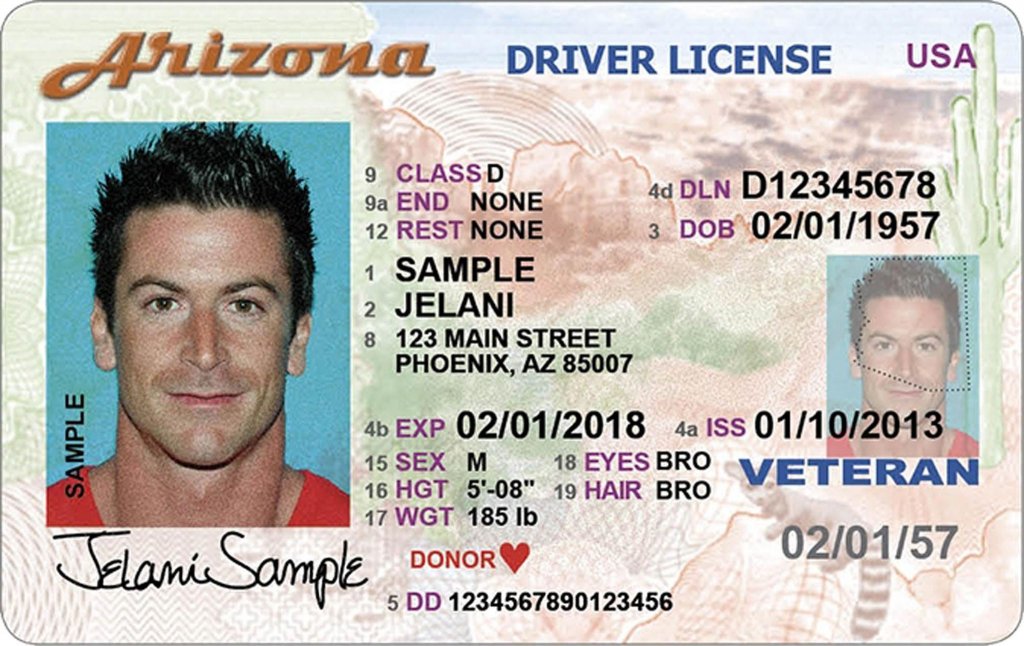
Mindee’s Driver License OCR API uses deep learning to automatically, accurately, and instantaneously parse your documents details. In a few seconds, the API extracts a set of data from your PDFs or photos of driver licenses, including:
* Country Code
* State
* ID
* Category
* Last Name
* First Name
* Date of Birth
* Place of Birth
* Expiry Date
* Issued Date
* Issuing Authority
* MRZ
* DD Number
The Driver License OCR API supports documents from US and all EU countries. The documents from other nationalities and states are not supported with this model.
## Set up the API
{% hint style="info" %}
**Create an API key**
To begin using the Mindee V1 OCR API, your first step is to [create your V1 API key](/v1/get-started/create-api-key.md).
{% endhint %}
1. To test your API, you can use the sample document provided below.
2. Access your Driver License OCR API by clicking on the corresponding product card in the **Document Catalog**\\
3. From the left navigation, go to [**documentation**](/v1/platform-ui-tour/api-documentation.md#api-reference) **> API Reference**, you'll find sample code in popular languages and command line.
```python
from mindee import Client, product, AsyncPredictResponse
# Init a new client
mindee_client = Client(api_key="my-api-key-here")
# Load a file from disk
input_doc = mindee_client.source_from_path("/path/to/the/file.ext")
# Load a file from disk and enqueue it.
result: AsyncPredictResponse = mindee_client.enqueue_and_parse(
product.DriverLicenseV1,
input_doc,
)
# Print a brief summary of the parsed data
print(result.document)
```
```javascript
const mindee = require("mindee");
// for TS or modules:
// import * as mindee from "mindee";
// Init a new client
const mindeeClient = new mindee.v1.Client({ apiKey: "my-api-key-here" });
// Load a file from disk
const inputSource = mindeeClient.docFromPath("/path/to/the/file.ext");
// Parse the file
const apiResponse = mindeeClient.enqueueAndParse(
mindee.v1.product.DriverLicenseV1,
inputSource
);
// Handle the response Promise
apiResponse.then((resp) => {
// print a string summary
console.log(resp.document.toString());
});
```
```csharp
using Mindee;
using Mindee.Input;
using Mindee.Product.DriverLicense;
string apiKey = "my-api-key-here";
string filePath = "/path/to/the/file.ext";
// Construct a new client
MindeeClient mindeeClient = new MindeeClient(apiKey);
// Load an input source as a path string
// Other input types can be used, as mentioned in the docs
var inputSource = new LocalInputSource(filePath);
// Call the product asynchronously with auto-polling
var response = await mindeeClient
.EnqueueAndParseAsync(inputSource);
// Print a summary of all the predictions
System.Console.WriteLine(response.Document.ToString());
// Print only the document-level predictions
// System.Console.WriteLine(response.Document.Inference.Prediction.ToString());
```
```ruby
#
# Install the Ruby client library by running:
# gem install mindee
#
require 'mindee'
# Init a new client
mindee_client = Mindee::Client.new(api_key: 'my-api-key')
# Load a file from disk
input_source = mindee_client.source_from_path('/path/to/the/file.ext')
# Parse the file
result = mindee_client.parse(
input_source,
Mindee::Product::DriverLicense::DriverLicenseV1
)
# Print a full summary of the parsed data in RST format
puts result.document
# Print the document-level parsed data
# puts result.document.inference.prediction
```
```java
import com.mindee.MindeeClient;
import com.mindee.input.LocalInputSource;
import com.mindee.parsing.common.AsyncPredictResponse;
import com.mindee.product.driverlicense.DriverLicenseV1;
import java.io.File;
import java.io.IOException;
public class SimpleMindeeClient {
public static void main(String[] args) throws IOException, InterruptedException {
String apiKey = "my-api-key-here";
String filePath = "/path/to/the/file.ext";
// Init a new client
MindeeClient mindeeClient = new MindeeClient(apiKey);
// Load a file from disk
LocalInputSource inputSource = new LocalInputSource(new File(filePath));
// Parse the file asynchronously
AsyncPredictResponse response = mindeeClient.enqueueAndParse(
DriverLicenseV1.class,
inputSource
);
// Print a summary of the response
System.out.println(response.toString());
// Print a summary of the predictions
// System.out.println(response.getDocumentObj().toString());
// Print the document-level predictions
// System.out.println(response.getDocumentObj().getInference().getPrediction().toString());
// Print the page-level predictions
// response.getDocumentObj().getInference().getPages().forEach(
// page -> System.out.println(page.toString())
// );
}
}
```
```bash
API_KEY='my-api-key-here'
ACCOUNT='mindee'
ENDPOINT='driver_license'
VERSION='1'
FILE_PATH='/path/to/your/file.png'
# Maximum amount of retries to get the result of a queue
MAX_RETRIES=10
# Delay between requests
DELAY=6
# Enqueue the document for async parsing
QUEUE_RESULT=$(curl -sS --request POST \
-H "Authorization: Token $API_KEY" \
-H "Content-Type: multipart/form-data" \
-F "document=@$FILE_PATH" \
"https://api.mindee.net/v1/products/$ACCOUNT/$ENDPOINT/v$VERSION/predict_async")
# Status code sent back from the server
STATUS_CODE=$(echo "$QUEUE_RESULT" | grep -oP "[\"|']status_code[\"|']:[\s][\"|']*[a-zA-Z0-9-]*" | rev | cut --complement -f2- -d" " | rev)
# Check that the document was properly queued
if [ -z "$STATUS_CODE" ] || [ "$STATUS_CODE" -gt 399 ] || [ "$STATUS_CODE" -lt 200 ]
then
if [ -z "$STATUS_CODE" ]
then
echo "Request couldn't be processed."
exit 1
fi
echo "Error $STATUS_CODE was returned by API during enqueuing. "
# Print the additional details, if there are any:
ERROR=$(echo "$QUEUE_RESULT" | grep -oP "[\"|']error[\"|']:[\s]\{[^\}]*" | rev | cut --complement -f2- -d"{" | rev)
if [ -z "$ERROR" ]
then
exit 1
fi
# Details on the potential error:
ERROR_CODE=$(echo "$ERROR" | grep -oP "[\"|']code[\"|']:[\s]\"[^(\"|\')]*" | rev | cut --complement -f2- -d"\"" | rev)
MESSAGE=$(echo "$QUEUE_RESULT" | grep -oP "[\"|']message[\"|']:[\s]\"[^(\"|\')]*" | rev | cut --complement -f2- -d"\"" | rev)
DETAILS=$(echo "$QUEUE_RESULT" | grep -oP "[\"|']details[\"|']:[\s]\"[^(\"|\')]*" | rev | cut --complement -f2- -d"\"" | rev)
echo "This was the given explanation:"
echo "-------------------------"
echo "Error Code: $ERROR_CODE"
echo "Message: $MESSAGE"
echo "Details: $DETAILS"
echo "-------------------------"
exit 1
else
echo "File sent, starting to retrieve from server..."
# Get the document's queue ID
QUEUE_ID=$(echo "$QUEUE_RESULT" | grep -oP "[\"|']id[\"|']:[\s][\"|'][a-zA-Z0-9-]*" | rev | cut --complement -f2- -d"\"" | rev)
# Amount of attempts to retrieve the parsed document were made
TIMES_TRIED=1
# Try to fetch the file until we get it, or until we hit the maximum amount of retries
while [ "$TIMES_TRIED" -lt "$MAX_RETRIES" ]
do
# Wait for a bit at each step
sleep $DELAY
# Note: we use -L here because the location of the file might be behind a redirection
PARSED_RESULT=$(curl -sS -L \
-H "Authorization: Token $API_KEY" \
"https://api.mindee.net/v1/products/$ACCOUNT/$ENDPOINT/v$VERSION/documents/queue/$QUEUE_ID")
# Isolating the job (queue) & the status to monitor the document
JOB=$(echo "$PARSED_RESULT" | grep -ioP "[\"|']job[\"|']:[\s]\{[^\}]*" | rev | cut --complement -f2- -d"{" | rev)
QUEUE_STATUS=$(echo "$JOB" | grep -ioP "[\"|']status[\"|']:[\s][\"|'][a-zA-Z0-9-]*" | rev | cut --complement -f2- -d"\"" | rev)
if [ "$QUEUE_STATUS" = "completed" ]
then
# Print the result
echo "$PARSED_RESULT"
# Optional: isolate the document:
# DOCUMENT=$(echo "$PARSED_RESULT" | grep -ioP "[\"|']document[\"|']:[\s].*([\"|']job[\"|'])" | rev | cut -f2- -d"," | rev)
# echo "{$DOCUMENT}"
# Remark: on compatible shells, fields can also be extracted through the use of tools like jq:
# DOCUMENT=$(echo "$PARSED_RESULT" | jq '.["document"]')
exit 0
fi
TIMES_TRIED=$((TIMES_TRIED+1))
done
fi
echo "Operation aborted, document not retrieved after $TIMES_TRIED tries"
exit 1
```
```php
sourceFromPath("/path/to/the/file.ext");
// Parse the file asynchronously
$apiResponse = $mindeeClient->enqueueAndParse(DriverLicenseV1::class, $inputSource);
echo $apiResponse->document;
```
* Replace **my-api-key-here** with your new API key, or use the "select an API key" feature and it will be filled automatically.
* Copy and paste the sample code of your desired choice in your application, code environment or terminal.
* Replace `/path/to/my/file` with the path to your document.
* Replace **my-api-key-here** with your new API key, or use the **select an API key** feature and it will be filled automatically.
* Copy and paste the sample code of your desired choice in your application, code environment, terminal etc.
* Replace `/path/to/the/file.ext` with the path to your input document.
{% hint style="warning" %}
Remember to replace with your V1 API key.
{% endhint %}
4. Run your code. You will receive a JSON response with your document details.
## API Response
Here is the full JSON response you get when you call the API:
```json
{
"api_request": {
"error": {},
"resources": [
"document",
"job"
],
"status": "success",
"status_code": 200,
"url": "https://api.mindee.net/v1/products/mindee/driver_license/v1/documents/4c95af66-341c-4021-bdb7-d38fa2bbee16"
},
"document": {
"id": "4c95af66-341c-4021-bdb7-d38fa2bbee16",
"inference": {
"extras": {},
"finished_at": "2024-11-18T15:06:22.437000",
"is_rotation_applied": true,
"pages": [
{
"extras": {},
"id": 0,
"orientation": {
"value": 0
},
"prediction": {}
}
],
"prediction": {
"category": {
"page_id": 0,
"polygon": [
[
0.386,
0.251
],
[
0.492,
0.251
],
[
0.492,
0.282
],
[
0.386,
0.282
]
],
"value": "D"
},
"country_code": {
"page_id": 0,
"polygon": [
[
0.039,
0.045
],
[
0.421,
0.045
],
[
0.421,
0.147
],
[
0.039,
0.147
]
],
"value": "USA"
},
"date_of_birth": {
"page_id": 0,
"polygon": [
[
0.732,
0.322
],
[
0.916,
0.322
],
[
0.916,
0.372
],
[
0.732,
0.372
]
],
"value": "1957-02-01"
},
"dd_number": {
"page_id": 0,
"polygon": [
[
0.383,
0.85
],
[
0.658,
0.85
],
[
0.658,
0.989
],
[
0.383,
0.989
]
],
"value": "1234567890123456"
},
"expiry_date": {
"page_id": 0,
"polygon": [
[
0.445,
0.635
],
[
0.631,
0.635
],
[
0.631,
0.68
],
[
0.445,
0.68
]
],
"value": "2018-02-01"
},
"first_name": {
"page_id": 0,
"polygon": [
[
0.384,
0.452
],
[
0.502,
0.452
],
[
0.502,
0.491
],
[
0.384,
0.491
]
],
"value": "Jelani"
},
"id": {
"page_id": 0,
"polygon": [
[
0.723,
0.259
],
[
0.914,
0.259
],
[
0.914,
0.311
],
[
0.723,
0.311
]
],
"value": "D12345678"
},
"issued_date": {
"page_id": 0,
"polygon": [
[
0.736,
0.635
],
[
0.922,
0.635
],
[
0.922,
0.68
],
[
0.736,
0.68
]
],
"value": "2013-01-10"
},
"issuing_authority": {
"page_id": 0,
"polygon": [],
"value": null
},
"last_name": {
"page_id": 0,
"polygon": [
[
0.384,
0.395
],
[
0.521,
0.395
],
[
0.521,
0.437
],
[
0.384,
0.437
]
],
"value": "Sample"
},
"mrz": {
"page_id": 0,
"polygon": [],
"value": null
},
"place_of_birth": {
"page_id": 0,
"polygon": [],
"value": null
},
"state": {
"page_id": 0,
"polygon": [
[
0.508,
0.546
],
[
0.542,
0.546
],
[
0.542,
0.579
],
[
0.508,
0.579
]
],
"value": "AZ"
}
},
"processing_time": 6.041,
"product": {
"features": [
"country_code",
"state",
"id",
"category",
"last_name",
"first_name",
"date_of_birth",
"place_of_birth",
"expiry_date",
"issued_date",
"issuing_authority",
"mrz",
"dd_number"
],
"name": "mindee/driver_licence",
"type": "standard",
"version": "1.0"
},
"started_at": "2024-11-18T15:06:16.112000"
},
"n_pages": 1,
"name": "arizona_h (1).jpg"
},
"job": {
"available_at": "2024-11-18T15:06:22.450000",
"error": {},
"id": "f235e482-9f0a-4469-bdcf-085d39263389",
"issued_at": "2024-11-18T15:06:16.112000",
"status": "completed"
}
}
```
You can find the prediction within the `prediction` key found in **`document > inference > prediction` for document-level predictions**: it contains the different fields extracted at the document level, meaning that for multi-pages PDFs, we reconstruct a single object using all the pages.
Each predicted field may contain one or several values including:
* a `polygon` highlighting the information location
* a `page_id` where the information was found (document level only)
## Detailed Field Information
Using the above document example the following are the basic fields that can be extracted.
* [Country Code](#country-code)
* [State](#state)
* [ID](#id)
* [Category](#category)
* [Last Name](#last-name)
* [First Name](#first-name)
* [Date of Birth](#date-of-birth)
* [Place of Birth](#place-of-birth)
* [Expiry Date](#expiry-date)
* [Issued Date](#issued-date)
* [Issuing Authority](#issuing-authority)
* [MRZ](#mrz)
* [DD Number](#dd-number)
### Country Code
* **country\_code**: The alpha-3 ISO 3166 code of the country where the driver license was issued.
```json
{
"country_code": {
"page_id": 0,
"polygon": [
[
0.039,
0.045
],
[
0.421,
0.045
],
[
0.421,
0.147
],
[
0.039,
0.147
]
],
"value": "USA"
}
}
```
### State
* **state**: second part of the ISO 3166-2 code consisting in 2 letters indicating the US State.
```json
{
"state": {
"page_id": 0,
"polygon": [
[
0.508,
0.546
],
[
0.542,
0.546
],
[
0.542,
0.579
],
[
0.508,
0.579
]
],
"value": "AZ"
}
}
```
### ID
* **id**: The unique identifier of the driver license.
```json
{
"id": {
"page_id": 0,
"polygon": [
[
0.723,
0.259
],
[
0.914,
0.259
],
[
0.914,
0.311
],
[
0.723,
0.311
]
],
"value": "D12345678"
}
}
```
### Category
* **category**: The category or class of the driver license..
```json
{
"category": {
"page_id": 0,
"polygon": [
[
0.386,
0.251
],
[
0.492,
0.251
],
[
0.492,
0.282
],
[
0.386,
0.282
]
],
"value": "D"
}
}
```
### Last Name
* **last\_name**: The last name of the driver license Holder.
```json
```
### First Name
* **first\_name**: The first name of the driver license holder.
```json
{
"first_name": {
"page_id": 0,
"polygon": [
[
0.384,
0.452
],
[
0.502,
0.452
],
[
0.502,
0.491
],
[
0.384,
0.491
]
],
"value": "Jelani"
}
}
```
### Date of Birth
* **date\_of\_birth**: The date of birth of the driver license holder.
```json
{
"date_of_birth": {
"page_id": 0,
"polygon": [
[
0.732,
0.322
],
[
0.916,
0.322
],
[
0.916,
0.372
],
[
0.732,
0.372
]
],
"value": "1957-02-01"
}
}
```
### Place of Birth
* **place\_of\_birth**: The place of birth of the driver license holder.
```json
{
"place_of_birth": {
"page_id": 0,
"polygon": [],
"value": null
}
}
```
### Expiry Date
* **expiry\_date**: The expiry date of the driver license.
```json
{
"expiry_date": {
"page_id": 0,
"polygon": [
[
0.445,
0.635
],
[
0.631,
0.635
],
[
0.631,
0.68
],
[
0.445,
0.68
]
],
"value": "2018-02-01"
}
}
```
### Issued Date
* **issued\_date**: The date the driver license was issued.
```json
{
"issued_date": {
"page_id": 0,
"polygon": [
[
0.736,
0.635
],
[
0.922,
0.635
],
[
0.922,
0.68
],
[
0.736,
0.68
]
],
"value": "2013-01-10"
}
}
```
\\
### Issuing Authority
* **issuing\_authority**: The authority that issued the driver license.
```json
{
"issuing_authority": {
"page_id": 0,
"polygon": [],
"value": null
}
}
```
\\
### MRZ
* **mrz**: The Machine Readable Zone (MRZ) of the driver license.
```json
{
"mrz": {
"page_id": 0,
"polygon": [],
"value": null
}
}
```
### DD Number
* **dd\_number**: The DD Number of the driver license.
```json
{
"dd_number": {
"page_id": 0,
"polygon": [
[
0.383,
0.85
],
[
0.658,
0.85
],
[
0.658,
0.989
],
[
0.383,
0.989
]
],
"value": "1234567890123456"
}
}
```
---
# Agent Instructions
This documentation is published with GitBook. GitBook is the documentation platform designed so that both humans and AI agents can read, navigate, and reason over technical content effectively. Learn more at gitbook.com.
## Querying This Documentation
If you need additional information that is not directly available in this page, you can query the documentation by asking a question.
Perform an HTTP GET request on the following URL with the `ask` and `goal` query parameters:
```
GET https://docs.mindee.com/v1/off-the-shelf-products/driver-license.md?ask=&goal=
```
`ask` is the immediate question: it should be specific, self-contained, and written in natural language.
`goal` is what the user is ultimately trying to achieve, the reason they need the answer. Sharing it helps GitBook give you a better, more relevant answer. A goal is most helpful when it describes the outcome the user wants rather than restating the question. For example, with `ask=how do I create an API token`, a goal like `automate deployments from our CI pipeline` lets GitBook tailor the answer to that use case.
The response will contain a direct answer to the question and relevant excerpts and sources from the documentation.
Use this mechanism when the answer is not explicitly present in the current page, you need clarification or additional context, or you want to retrieve related documentation sections.