> For the complete documentation index, see [llms.txt](https://docs.mindee.com/llms.txt). Markdown versions of documentation pages are available by appending `.md` to page URLs; this page is available as [Markdown](https://docs.mindee.com/extraction-models/optional-features/polygons-bounding-boxes.md).
# Polygons (Bounding Boxes)
Add the polygon coordinates of each extracted field to the API response.
## Overview
The **polygons** option, also commonly referred to as **bounding boxes**, is a feature you can enable in your Models.\
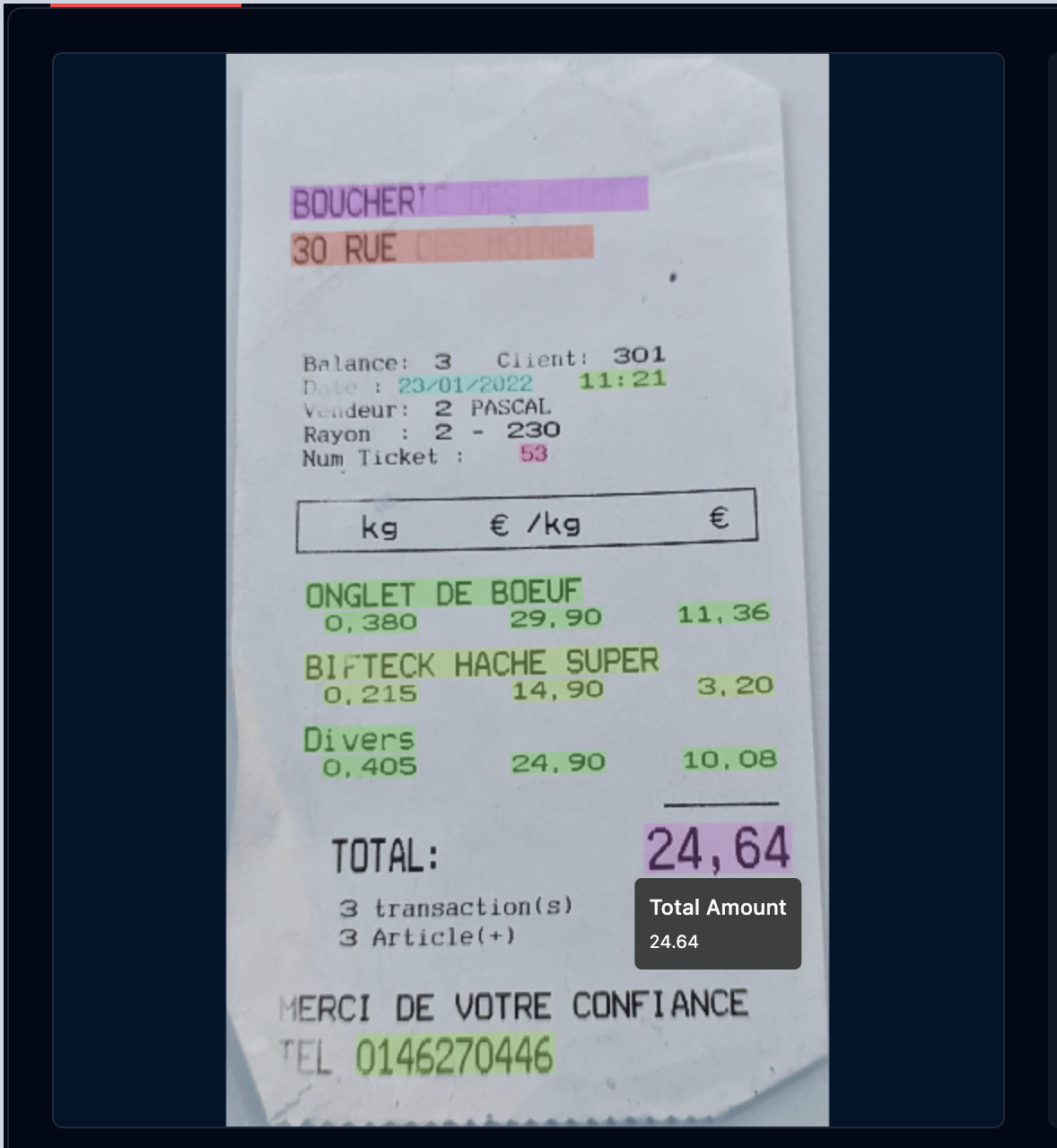
It indicates the precise polygonal area on the document where the value for each extracted field was detected.
* These polygons define the **exact location on the document** containing the extracted data.
* They enable visual verification by highlighting where the model found each value on the document.
* This feature is especially useful for building user interfaces that overlay extracted data on document images for validation or review.
## How It Works
* A polygon (bounding box) is an array of points outlining a closed shape around the detected data area.
* Points are given as normalized coordinates relative to the document page dimensions:
* Each coordinate is a float between `0` and `1`.
* `(0, 0)` corresponds to the top-left corner; `(1, 1)` corresponds to the bottom-right corner.
* Multiple polygons can be returned if there are several extracted fields or data areas.
## **Activate Polygons**
### Activate Polygons on the Platform
When setting the activation state of a feature on the Platform, this will be the default.\
All API calls will use the default state unless explicitly set otherwise during the API call.
This is useful for project managers, as it allows activating or deactivating a feature across all API calls on that model.
Anyone with write access to the model can set the option's default value.
{% @supademo/embed url="" demoId="cmeidsob99f8xh3pybta14v42" %}
### Activate Polygons via API Calls
If you need finer-grained control over when the feature is used, you can activate or deactivate it when making API calls.
This allows dynamically setting the activation state using your internal business or domain logic.
Check the [Client Configuration](/integrations/client-libraries-sdk/configure-the-client.md#optional-features-configuration) section if using our [Client Libraries / SDKs](/integrations/client-libraries-sdk.md).
## Use the Polygon Result
We highly recommend using our [Client Libraries / SDKs](/integrations/client-libraries-sdk.md), as they include various geometry functions for ease of processing.
Specifically for handling polygons, take a look at the [Extraction Result](/extraction-models/sdk-integration/extraction-result.md#locations) section.
Otherwise, take a look at the [Manual Integration](/integrations/api-reference.md#get-v2-inferences-inference_id) section.
## Some Use Cases
* Visual validation by overlaying bounding boxes on document previews for users to confirm extraction accuracy.
* Debugging extraction quality by analyzing detected regions.
* Enhancing UI with highlighted fields for better user experience.
---
# Agent Instructions
This documentation is published with GitBook. GitBook is the documentation platform designed so that both humans and AI agents can read, navigate, and reason over technical content effectively. Learn more at gitbook.com.
## Querying This Documentation
If you need additional information that is not directly available in this page, you can query the documentation dynamically by asking a question.
Perform an HTTP GET request on the current page URL with the `ask` query parameter, and the optional `goal` query parameter:
```
GET https://docs.mindee.com/extraction-models/optional-features/polygons-bounding-boxes.md?ask=&goal=
```
`ask` is the immediate question: it should be specific, self-contained, and written in natural language.
`goal` is optional and describes the broader end goal you are ultimately trying to accomplish on behalf of the user. GitBook uses it to tailor the answer towards what is most useful for that goal.
The response will contain a direct answer to the question and relevant excerpts and sources from the documentation.
Use this mechanism when the answer is not explicitly present in the current page, you need clarification or additional context, or you want to retrieve related documentation sections.