# Data Schema Best Practices

{% hint style="info" %}
We recommend taking a look at [Data Schema Overview](/extraction-models/data-schema.md) first.\
This will help you understand the terms used on this page.
{% endhint %}

To get the best possible extraction data from a model, the key is to ensure that the Data Schema you're using is clear and optimized.

Any additional features you activate to increase accuracy, such as [Continuous Learning (RAG)](/extraction-models/optional-features/improving-accuracy.md) or [Confidence Score and Accuracy Boost](/extraction-models/optional-features/automation-confidence-score.md) will rely heavily on the Data Schema.

## **Best Practices for Fields**

The heart of the Data Schema. The various properties of fields all have a role to play in getting the best possible accuracy.

### **Field Name and Title**

The field *Name* is automatically generated from the field *Title*. You can also modify the *Title* afterwards.

Both the *Name* and *Title* are used during processing (inference).

Use clear, simple names that will precisely describe the field you want to extract.\
The goal is to avoid any possible confusion between data points present in the document.

As an example, let's extract the name of the company that issued an invoice.

In our Data Schema, we've used the field *Name*: `supplier_name`\
It clearly tells the model to extract only the name of the invoice supplier.

:white\_check\_mark: you could also use `vendor_name`, it has a similar meaning and equivalent precision.

:warning: `supplier` might work but is too broad: which information about the supplier is needed, exactly?

:warning: `company_name` might work but is ambiguous: we know you need the name of the company, but we don't know if company stands for supplier or customer.

:x: `company` will likely not work as expected: we know neither what information you need nor which company is concerned.

### Field Type

Try to use one of the [Data Schema Overview](/extraction-models/data-schema.md#field-types) that best matches how the field is used and how it appears on the document.

For example, while you could use a string for `due_date`, a date field type is definitely better.

### Field Description

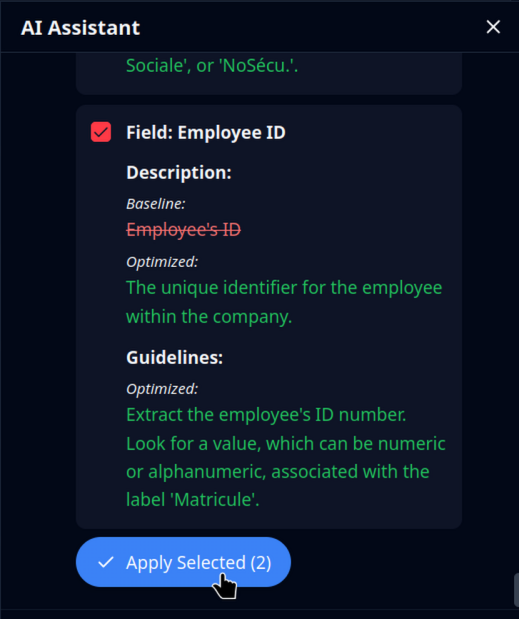
The field's *Description* has an impact on the model's performance.

Use it to describe what the field represents, and/or of what its use is to you.

For example, the `supplier_name` field could have:

> The name of the supplier.
>
> Used in internal processing to match our supplier ID with the name found on the document.

### Field Extraction Guidelines

Sometimes changing the field name and type is not enough to explain what you need for one field.\
In that case you can add extraction *Guidelines* to the field.

Use natural language to explain how to properly extract the data, and/or any extra steps like formatting.

For instance, with `supplier_phone_number`, adding the following extraction guidelines could be useful:

> If you find several phone numbers in the document, use the phone number of the supplier headquarters.
>
> Always reformat the data to match the international phone number format, as follows: +1-212-867-5309

## Relative Importance of Field Properties

Not all field properties have the same importance or weight when it comes to how the models process files.

Additionally, not all types of fields are handled the same way.

In the following table, "Normal Fields" are those that extract textual information from the document (text, dates, numbers, etc), whether they are simple fields, lists, or nested object fields.

"Object Detection" refers to specific processing to extract polygons of various elements on the document, such as signatures, ID photos, etc.

<table><thead><tr><th width="208.0001220703125">Property</th><th width="261.4000244140625">Normal Field Usage</th><th>Object Detection Usage</th></tr></thead><tbody><tr><td>Name</td><td><strong>Most important</strong></td><td>Not used</td></tr><tr><td>Title</td><td>Important</td><td><strong>Most important</strong></td></tr><tr><td>Description</td><td>Complementary</td><td>Not used</td></tr><tr><td>Guidelines</td><td>Complementary</td><td>Not used</td></tr><tr><td>Classification Values</td><td>Very important (only for classification fields)</td><td>Not used</td></tr></tbody></table>

## Less Is More

It can be tempting to give very detailed instructions in guidelines and descriptions. However, in many cases this is actually counterproductive and will lead to diminished accuracy.

Here is an example of too many details (don't do this):

> The order number is usually next to the words "order no" on the invoice, but sometimes there is no order number, so it will be next to the words "customer invoice no". It is usually present on the first page, in a green box.

What's wrong here? Well, the first thing to understand is that you are not giving instructions to a human, but to a machine. Machines prefer concise instructions. On the other hand, this machine has been trained on millions of documents, and is perfectly capable of determining the location of a value field on its own.

So what's left is just the instruction about the *customer invoice* and *order number*.

A simpler, better version would be:

> Use the value of "customer invoice number" if "order number" is missing in the document.

## Remove Ambiguity with Extra Fields

In some cases, it can be beneficial to add extra fields you don't actually need in order to remove ambiguity on the data you do need.

Let's say you are processing invoices, and need to extract the "Reference Number". When processing the invoices, you notice that, sometimes, the "Order Number" is picked up as the reference number.

A first logical step would be to add a guideline, something like *"NEVER use the 'Order Number' to populate this field"*. While this should work in **most** cases, the distinction between a Reference and Order may not be perfectly clear to the model.

Adding more text or more detailed information is potentially [counterproductive](#less-is-more).

A potential fix would be to add the "Reference Number" field in your Data Schema, in addition to the "Order Number" field. This way the ambiguity is lifted, it is now very clear to the model that these are separate data points.

Then, in your data processing flow, simply ignore the extra field.

As a reminder, the number of fields in the Data Schema has no impact on pricing.

## Frequently Asked Questions

### When should I use Data Schema guidelines vs RAG guidelines?

Both work in the same way to provide extra context for the model to better identify data and extract them.

The major difference is *when* they are applied:

If the guideline is to be applied to all documents ⇒ use the Data Schema guideline.

If the guideline only applies to a specific template ⇒ use the RAG guideline.

### Can the model correctly interpret positions like top, bottom, etc?

Mindee models are multimodal, meaning they use both textual and visual information.

As such it is possible to write guidelines conveying positional information, for example:

> The supplier logo will always be at the top of the page.

### Can I reference a specific location or text on the page?

Each page of the document is processed as a whole, and the models have both a visual component and a textual component (multimodal models).

It is therefore possible to reference other locations and texts of the page in guidelines.

This is especially useful to remove ambiguity when similar data is found in multiple locations on the page.

Referencing another location:

> The correct phone number is below the customer name.

Specifying a location and text:

> The correct customer name is found in the first line of the ship-to address.

### Does the model work better with field information in English?

In our own testing, major European languages such as French, Spanish, or German, are comparable to English in terms of modal accuracy.

In some cases, it *may* be beneficial to define the Data Schema, such as field names and descriptions, using the language present in the document. This can help improve accuracy, in particular when terms not easily translatable are used in the field definition.

For example, a model for French invoices may use "TVA Intracommunautaire" as the field name rather than "Intra-Community VAT", although both will work.

Best is to try both using the [Live Test](/models/live-test.md) feature.

### What are best practices for handling different regions or languages?

It's important to first make the distinction between *representation* and *content*.

Representation meaning that equivalent content can be showed or displayed differently (for language, this is a translation).

Content meaning that the structure of the data is different, regardless of its representation (language).

In the context of a Data Schema, the optimal configuration mainly depends on whether the data you need to extract (the content) changes depending on the region or language.

Typically the follow-up question is: should I use a single model or multiple models?

#### When to use different Models

If the data changes considerably, it will be beneficial to have different models for different regions.\
For example:

* different tax lines/calculations on invoices
* specific fields on ID documents
* different reporting on energy bills

Having different models to better fit the data to extract will generally provide more accurate results.\
It will also allow having specific [#field-extraction-guidelines](#field-extraction-guidelines "mention").

#### When to use a single Model

On the other hand, if the data to extract does not vary significantly, even when the language changes, there is generally no need to have different models.\
For example:

* same document, different language (multilingual countries like Belgium, Canada, India, etc)
* same data to extract, even if the document changes (only a subset of data is required)

## Next Steps

Once you are satisfied with your Data Schema, you'll likely to want to use one of our [Integrations](/integrations/api-overview.md) to connect your model with your platform.


---

# Agent Instructions: Querying This Documentation

If you need additional information that is not directly available in this page, you can query the documentation dynamically by asking a question.

Perform an HTTP GET request on the current page URL with the `ask` query parameter:

```
GET https://docs.mindee.com/extraction-models/data-schema-best-practices.md?ask=<question>
```

The question should be specific, self-contained, and written in natural language.
The response will contain a direct answer to the question and relevant excerpts and sources from the documentation.

Use this mechanism when the answer is not explicitly present in the current page, you need clarification or additional context, or you want to retrieve related documentation sections.
