> For the complete documentation index, see [llms.txt](https://docs.mindee.com/llms.txt). Markdown versions of documentation pages are available by appending `.md` to page URLs; this page is available as [Markdown](https://docs.mindee.com/account-management/insights.md).
# Insights
The insights page allows you to view various data concerning your usage of the Mindee platform and API.
## Overview
Use the insights page to view all of your requests over a given period.
Notably, you can keep track of your credit usage.
## Access the Insights Page
1. Go to [app.mindee.com](https://app.mindee.com/)
2. On the left-hand menu, click on **Insights**
Or simply click here: Go to Insights page
## Data Views
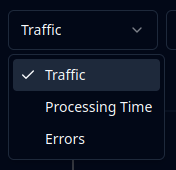
Selecting the Data View is done at the top of the page:
All Data Views will show the total usage, at the bottom of the page:
### Traffic View
The Traffic view shows the number of calls and the number of pages that were successfully processed.
These requests count towards your plan's credit usage, the number of credits consumed is shown.
This does not include calls that resulted in an error.
### Processing Time Views
The various Processing Time views show the time requests take to process, in seconds.
Processing time is calculated from when the request was received to when the [inference](/getting-started/glossary.md) was finished.
There are two possible views:
* Average: the average time across all requests.
* P95: the time within which 95% of all requests are processed (95th-percentile).
### Errors View
The Errors view shows the number of processing ([inference](/getting-started/glossary.md#inference)) errors.
This does not include user errors (HTTP 4xx), since these requests get rejected before any processing takes place.
Errors are shown for informational purposes only, they do not count towards your plan's credit usage.
## Data Filters
For all data views, the following filters are available.
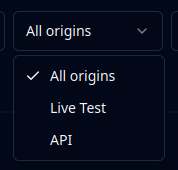
### Origin Filter
Filter based on the origin of the request.
"Live Test" is when using the [live test](/models/live-test.md) functionality on the platform.
"API" is for any request made using an API key.
### Date Range Filter
Filter based on start and end dates.
### Group By
Only affects the visualization. Group results by day, month, or year.
### API Key Filter
Show all API keys or filter on a specific one.
### Activated Options
Filter by [optional features](/extraction-models/optional-features.md) activated in the call.
3 states to choose from:
* empty: no filter
* check mark: show only calls with the option **active**
* minus sign: show only calls with the option **inactive**
---
# Agent Instructions
This documentation is published with GitBook. GitBook is the documentation platform designed so that both humans and AI agents can read, navigate, and reason over technical content effectively. Learn more at gitbook.com.
## Querying This Documentation
If you need additional information that is not directly available in this page, you can query the documentation dynamically by asking a question.
Perform an HTTP GET request on the current page URL with the `ask` query parameter, and the optional `goal` query parameter:
```
GET https://docs.mindee.com/account-management/insights.md?ask=&goal=
```
`ask` is the immediate question: it should be specific, self-contained, and written in natural language.
`goal` is optional and describes the broader end goal you are ultimately trying to accomplish on behalf of the user. GitBook uses it to tailor the answer towards what is most useful for that goal.
The response will contain a direct answer to the question and relevant excerpts and sources from the documentation.
Use this mechanism when the answer is not explicitly present in the current page, you need clarification or additional context, or you want to retrieve related documentation sections.